The Memory Engine aiwithmo.com
Put me on the list

Everything you tell your AI is gone by morning.

The Memory Engine reads every conversation you have with your AI, writes down what matters, and keeps a map of everything you told it. On your own Mac, not in the cloud. Nothing else does this.

the real one runs on my Mac

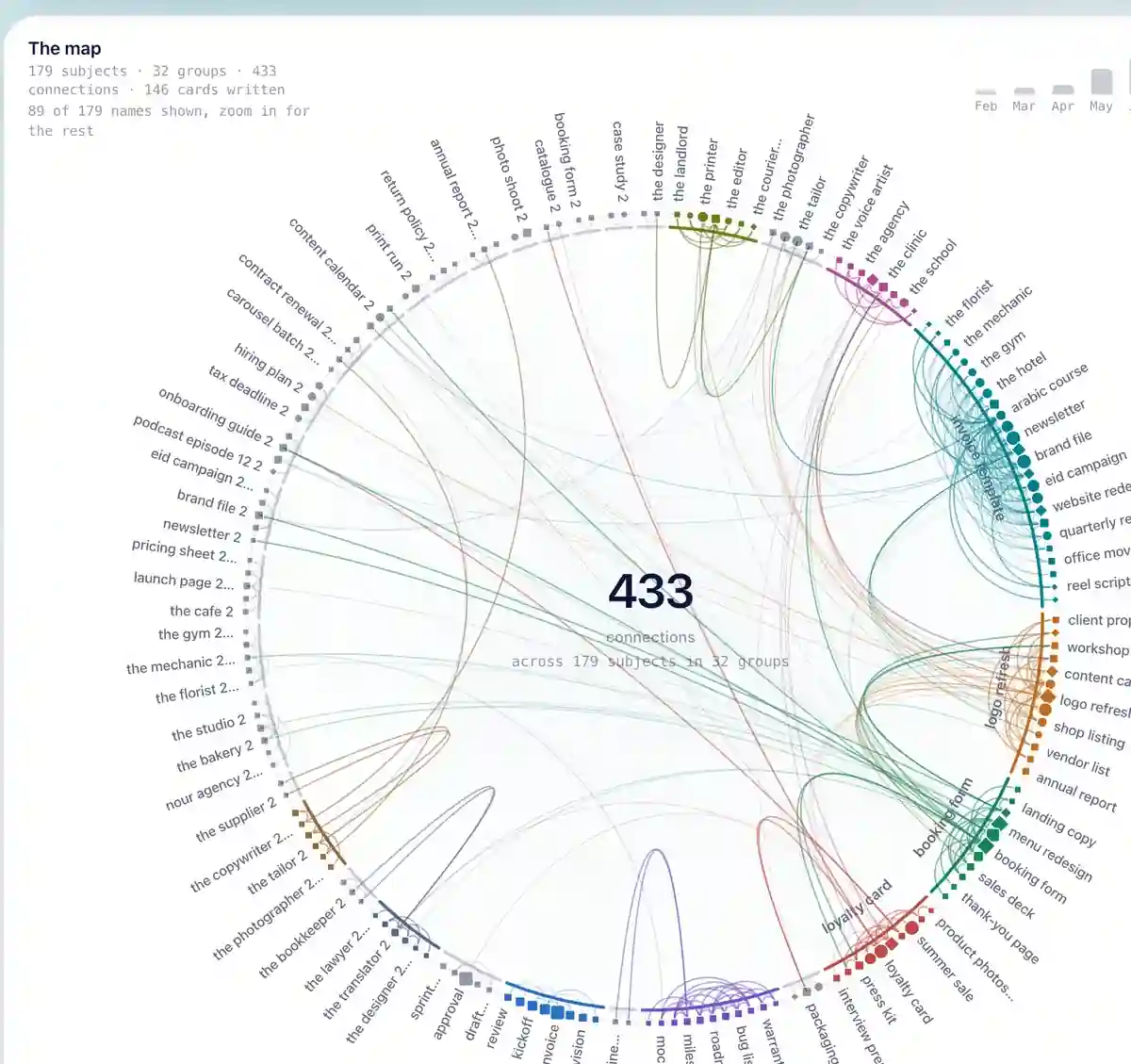
179 subjects, 433 connections, drawn by the engine from what I said. I wrote none of it by hand.

The map, rendered from the dashboard's own map.

02:14 · session open 02:59 · session ended

Nothing you type here leaves this page.

Nothing was kept. By morning it remembers none of this.

By midnight it has forgotten the client, the decision, and you.

Without this, your AI keeps nothing between one session and the next. Tomorrow you explain it all again. The day after, again.

09:00 · a new session opens. It knows nothing about you. Bring up the same client again, and some of the details are already missing.

09:01 · the next session opens with a brief

It stayed awake the whole time, taking notes.

session start · what the assistant reads first


Every 15 minutes the Engine reads the conversation you just had, keeps what is worth remembering, and adds it to your memory vault. This is the brief it hands your assistant at the start of the next session. A demo with your line; on your Mac it is built from your own notes.

Nothing gets lost. Your line is a subject on the map now, and tomorrow's session reads it before it says a word.

The map: 179 subjects on a ring in 32 groups, 433 connections drawn as arcs between them

Move over a dot to see what it is connected to.

the map, as it really is

Every dot is a person, a project or a term. Every line between two dots is a real connection the engine found.

My own map on 2026-09-06, drawn by the engine from what I said across 901 sessions. Nothing on it was placed by hand.

0 of 433 connections drawn

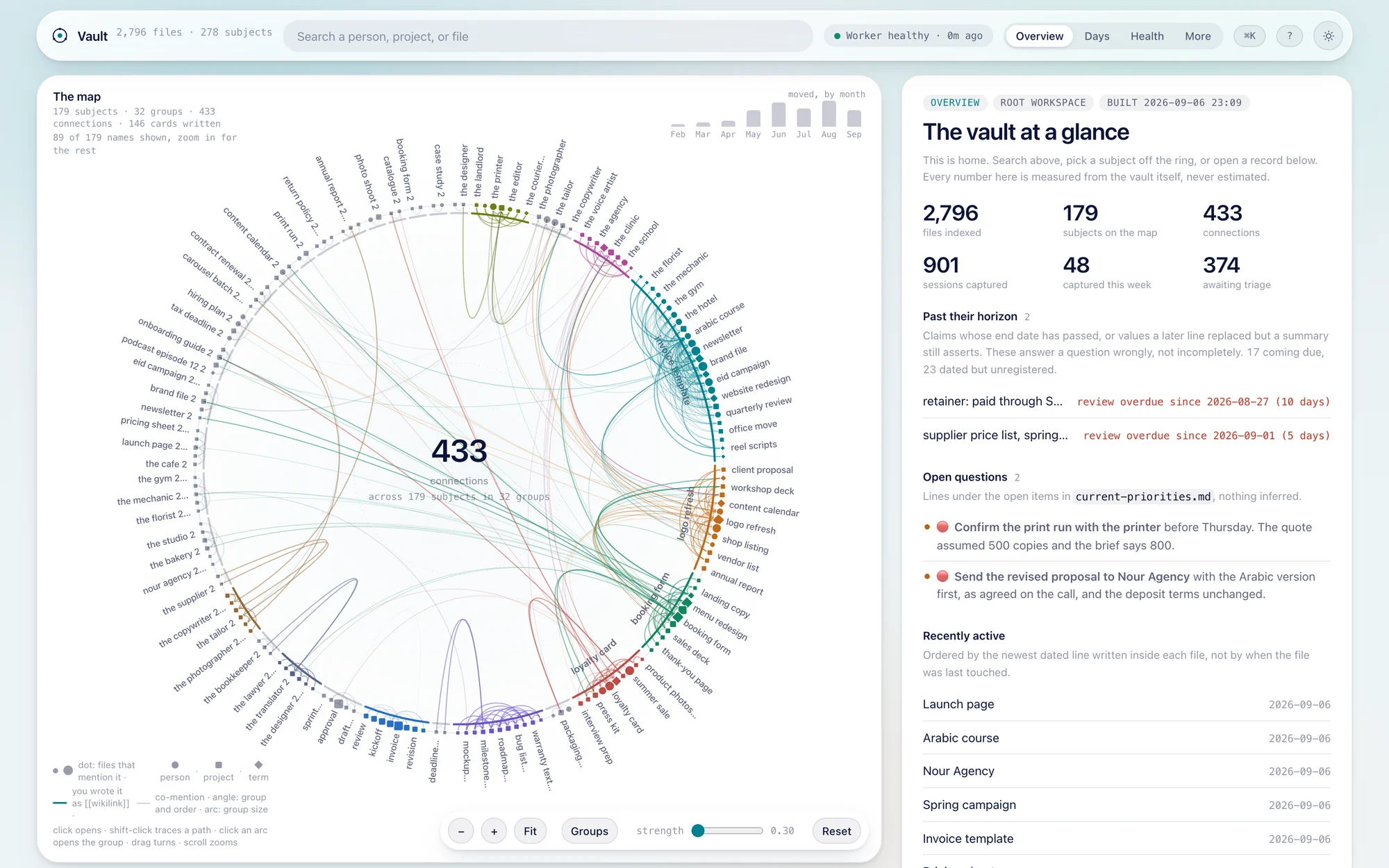
The Memory Engine dashboard: the map of every person, project and term with the connections between them, and the vault at a glance

the dashboard

Every morning, all of it on one page.

Every person, project and term, the connections between them, what moved this week, what is past its date, and what waits for your decision. A page on your own Mac, rebuilt every 15 minutes.

My own dashboard on 2026-09-06. Every number on it is real.

what it does

Six things it does for you, each with the screen that proves it.

sessions/2026-09-06-2207.md

worked on
The Memory Engine page: a third version, built on the dashboard's own map.
decided, and why
Photography is out. Every image is the system, because the page sells the system.
considered and rejected
A night-time study as the world. It read as mood, not mechanism.
still open
Which version goes live at /lp/memory-engine.

It writes every session down, by itself.

A dated note per session: what was done, what was decided and why, what was rejected and why, what is still open. This one is about building this page.
before anything is sent

ANTHROPIC_API_KEY=sk-ant-a7Qx9…3fRk [REDACTED-KEY]

postgres://user:h4x…@db.example [REDACTED-DB-URL]

It recognises seventeen kinds of password and key on sight, and anything that looks like one. If this check fails, nothing is sent at all.

It hides your passwords before anything is sent.

It hides secrets before it sends anything, and stops if it cannot. A problem can delay a note; it cannot leak one.

.memory/

  • people/one file per person
  • projects/one file per project
  • meetings/dated, with attendees and decisions
  • context/work-log/one line per session
  • sessions/one note per session
  • _inbox/pending/what waits for your yes or no

It files them as dated notes in a folder you own.

Plain text files in your own folder. Read every line, change it, delete it. It is yours, and it is what stays.

search · 0.09s

you type ذاكره

it also finds الذاكرة ذاكرة الذاكره

With a hamza or without one, a ta marbuta or a ha, and it learns names the way you type them.

It searches Arabic as well as English.

Sub-second, from any folder, in the language you think in.

sources · 2026-09-06

  • Claude Cowork667
  • Claude Code250
  • ChatGPT Codex157
  • Gemini10
  • Cursor0

Sessions found on my machine, by assistant. Cursor reads zero here because I do not use it; the adapter is in the box.

It reads five assistants into one folder.

Whichever assistant you use, the notes land in the same place, and every assistant reads them back.

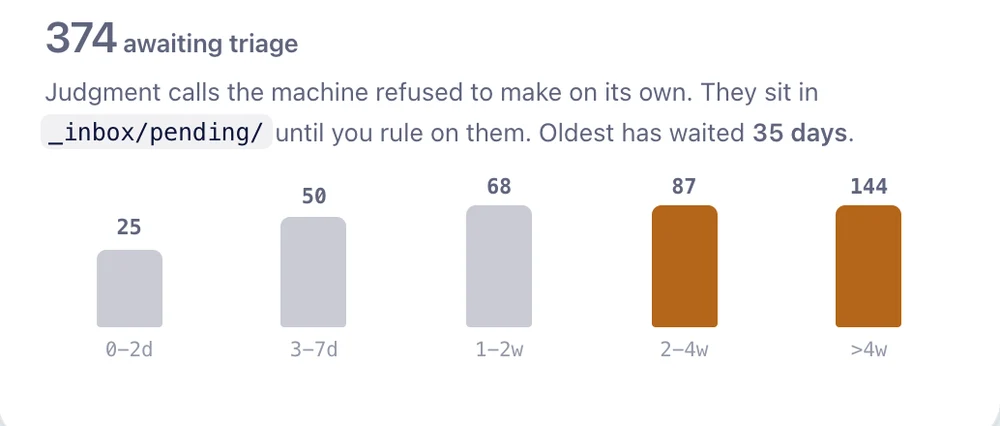
The dashboard's queue: 374 judgment calls waiting for a decision, grouped by how long they have waited

And it refuses to guess.

374 judgment calls waited for my yes or no on 2026-09-06. It never guesses about your clients or your money, and that is exactly why you can trust everything else it writes.

What setting it up actually looks like

  • It runs on a Mac or on Linux. On Windows through WSL2, which you install first. Not on a phone, and not in a browser tab.
  • You need one assistant you already use. ChatGPT Codex, Claude Cowork, Claude Code, Cursor or Gemini. Any one of them is enough, and it reads all five if you have all five.
  • It is one sitting, not a project. You paste a single line, it asks you a few plain questions, and it puts everything it needs in place. If you have never opened the terminal on your Mac, you will open it once, and the guide shows you exactly where.
  • You do not start from an empty folder. The first run reads the conversations already sitting on your machine, so on day one there is already something to search.
  • The few minutes a week are real. Anything it is not sure about waits for you to say yes or no. That is the honest cost of something that refuses to guess, and it is the one habit that decides whether this is still working in a year.

Do not buy this if

  • You want a notes app with an AI button. This is machinery around an assistant, not an editor.
  • You only work on a phone or a tablet.
  • You want it finished this afternoon. On its first run it goes back over the conversations already on your Mac, and it builds up from there. The folder you start today is the one you will be searching in a year, and every week you wait is a week missing from it.
  • You will never look at the suggestions box. Anything it is not sure about stops and waits for you, on purpose. That costs you a few minutes a week, and it is exactly why you can trust everything else it wrote.
  • You need a shared folder for a team, a phone app, or cloud sync. This is one person, one Mac, and their own work.
  • You want it to cost nothing at all to run. Reading, searching and remembering are all on your Mac and free. Writing the summary is a request to your assistant: nothing on top of the subscription you already pay for, or around twenty cents on a busy day if you would rather it used its own key, under a daily limit you set.
  • You are happy losing the last two years of decisions and would rather keep explaining them from memory.

The machine, or the machine and the habit

option one

The Engine

The whole system, on your own Mac, yours to keep. Nothing on this page is held back for the option beside it: the same reading of every session, the same hiding of passwords, the same walls between clients, the same Arabic, the same files. You set it up from a written guide I keep current, and the first run fills your folder from the conversations already on your machine. Most people will take this one, run it for a week, and never need to hear from me again.

option two

The Engine, and the first month with me

The same engine, and the one thing a download cannot ship: the habit of keeping a second brain, and someone who already has one. We set it up together on a call, and it is running in your own folders before we hang up, whether or not you have ever opened a terminal. Then we shape it around the clients and projects you actually have, in the language you think in, and I stay close while the first month decides what this becomes.

  • Everything in option one, switched fully on. Nothing here exists only in this option.
  • One call where we set it up together, and it is running in your folders before we hang up.
  • Your folders built around your real clients and projects, with the walls set for your actual client names instead of left on their defaults.
  • We run the first pass over the conversations already on your Mac and read what it wrote about you together, so you correct it instead of trusting it blindly.
  • Two sessions in the first month, with your own folder open in front of us.

Places are limited and filled in the order the list was joined. This option closes soon.

The engine is identical in both, and it will keep writing faithfully either way. The only thing option one does not include is a person who opens your folder with you in week six and names the one habit you let slip, which is the whole difference between keeping a second brain and owning software for keeping one.

The list buys first

Checkout opens at launch, and the list sees the launch price before this page shows it to anyone else. It will cost less than one forgotten decision.

  1. You are on the list, in the order you joined.
  2. The launch mail brings the price and your download, to the list before anyone else.
  3. A WhatsApp message the day checkout opens.

More from Ai With Mo at aiwithmo.com

which one do you want
which machine do you work on